Earfun UBoom L SP300 Battery Replacement

Jan 12,2026
U493074499
Jan 12,2026 at 4:1 am

Hi what is the model or specs required to replace the battery DIY? I can self replace.

Report Reply
U512838216
Feb 17,2026 at 4:59 pm

Hi,

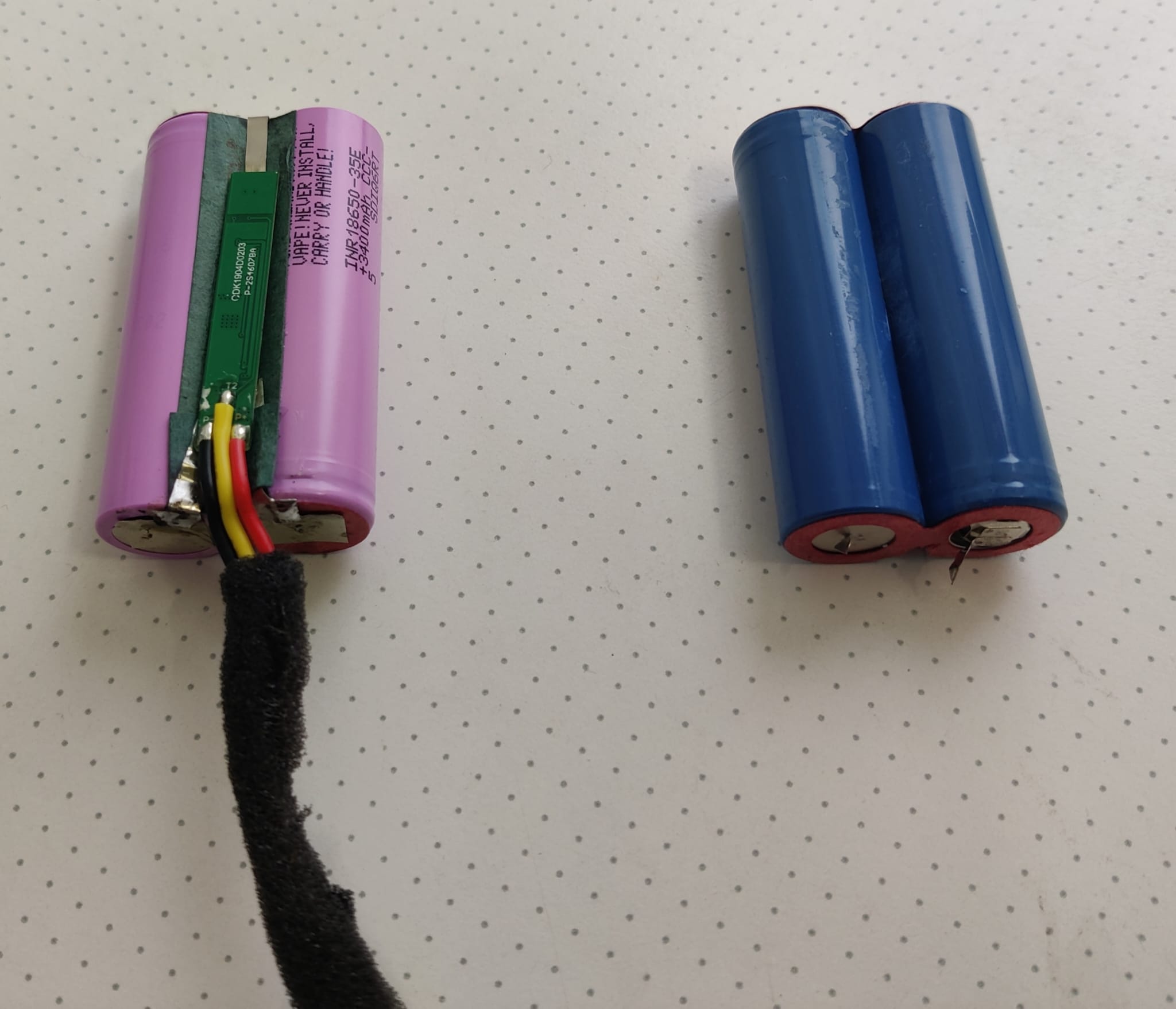
I just went through this and can tell you that you need a battery pack consisting of two 18650 cells in serial connection (= 7.4v). As the pack also contains a battery management board, you'll have to get yourself some cells (preferably pre-wired) and swap the BMS from your old to the new battery.

I went for these Samsung cells as they're a nice upgrade over the cheap stock 2.600mAh ones and come with tabs pre-welded, so it's quite easy to solder the BMS on them:

LINK

You might have to see what you can get locally. Judging by charging time and power consumption, most 18650s should fit the bill, these Samsungs are certainly more than capable enough at 10 Amps constant current.

One word of advice: you'll need to remove the left-hand bass radiator in order to remove the battery from the case. When reassembling, be careful not to overtighten the six screws holding the radiator down onto the case. Mine cracked as its frame is very thin and brittle. Now it's leaking air, which is a giant pain in the backside to fix. Be smarter than me. Good luck

PS: this is my new battery with the BMS already swapped onto the new Samsung cells on the left. You should of course insulate all contacts as on the original battery pack and protect it with shrink tube. lf you're not familiar with handling lithium ion batteries, better have someone else do all this for you. Shorting them out might cause fire or even explosion.
Report #1 Reply
U493074499
Feb 22,2026 at 8:18 am
U512838216 said:

Hi,

I just went through this and can tell you that you need a battery pack consisting of two 18650 cells in serial connection (= 7.4v). As the pack also contains a battery management board, you'll have to get yourself some cells (preferably pre-wired) and swap the BMS from your old to the new battery.

I went for these Samsung cells as they're a nice upgrade over the cheap stock 2.600mAh ones and come with tabs pre-welded, so it's quite easy to solder the BMS on them:

LINK

You might have to see what you can get locally. Judging by charging time and power consumption, most 18650s should fit the bill, these Samsungs are certainly more than capable enough at 10 Amps constant current.

One word of advice: you'll need to remove the left-hand bass radiator in order to remove the battery from the case. When reassembling, be careful not to overtighten the six screws holding the radiator down onto the case. Mine cracked as its frame is very thin and brittle. Now it's leaking air, which is a giant pain in the backside to fix. Be smarter than me. Good luck

PS: this is my new battery with the BMS already swapped onto the new Samsung cells on the left. You should of course insulate all contacts as on the original battery pack and protect it with shrink tube. lf you're not familiar with handling lithium ion batteries, better have someone else do all this for you. Shorting them out might cause fire or even explosion.

Click for original message

Hi well so I did purchase probably the correct battery but I had no idea about the BMS. So now its just turning on for a slight while before shutting down....

It seems like I cannot charge as well.

I'm not familiar with connecting the battery so I did purchase it from online. However is it a must to use back the original BMS? As I doubt the overseas china seller has the same BMS board.

Thanks!

Report #2 Reply
U512838216
Feb 24,2026 at 9:0 pm

If your battery pack is just the naked cells without any circuit board on it, I'd say it is outright dangerous to charge your Uboom, as charging current/voltage might be more or less unregulated. We're talking a serious fire hazard here.

On top, the BMS also prevents deep discharging the cells (below about 2.6 V per cell). If you still have the original pack, you absolutely need to transfer the BMS to your new battery. Do not use or charge your Uboom as it is now in this case.

Report #3 Reply
U493074499
Feb 25,2026 at 5:6 am
U512838216 said:

If your battery pack is just the naked cells without any circuit board on it, I'd say it is outright dangerous to charge your Uboom, as charging current/voltage might be more or less unregulated. We're talking a serious fire hazard here.

On top, the BMS also prevents deep discharging the cells (below about 2.6 V per cell). If you still have the original pack, you absolutely need to transfer the BMS to your new battery. Do not use or charge your Uboom as it is now in this case.

Click for original message

Noted. It has a different BMS board but now I'm waiting for another BMS to be send over. It doesn't allow charging anyways currently.

Report #4 Reply

Thread Info

0 Likes

4 Replies

3 Views

Last replied by U493074499

Community Highlight

About The Music Category About The Music Category

by EarFun Admin Dec 31,2021

Forum Statistics

972 Discussions

1703 Messages

3213 Members

Share this thread